
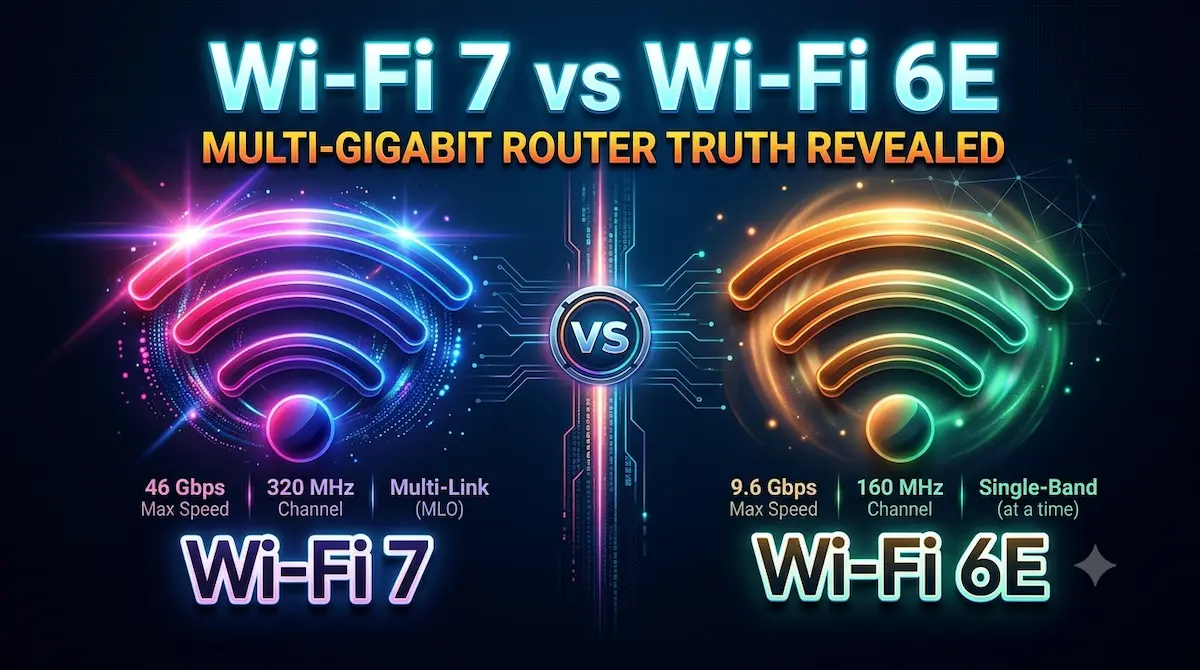
Both Wi-Fi 7 vs. Wi-Fi 6E are currently top-tier wireless standards. Most people use Wi-Fi 6E, but you might wonder whether upgrading makes sense for your home and how you use it. If you are buying new equipment for the first time or planning for the future, investing in Wi-Fi 7 could be the right long-term decision. Wi-Fi 6E (802.11ax) is an enhanced version that adds access to the 6 GHz band, delivering faster speeds and less congestion within the router’s range. Wi-Fi 7 (802.11be) is the latest wireless standard; it offers faster speeds and lower latency while efficiently handling multiple devices simultaneously.
Wi-Fi 7 (IEEE 802.11be) represents the next generation of Wi-Fi, building upon the foundation laid by Wi-Fi 6 and Wi-Fi 6E. This new standard brings significant improvements in speed, latency, capacity, and efficiency. Both belong to the 802.11 family, but Wi-Fi 6E builds on 802.11ax, while Wi-Fi 7 builds on the newer 802.11be standard. Wi-Fi 7 is designed to deliver about three to four times faster speeds than Wi-Fi 6E, with reduced latency and enhanced capacity for more users. In this piece, we compare Wi-Fi 7 Vs. Wi-Fi 6E, so you can make the right choice for your household.
A comparative study of Wi-Fi 7 vs. Wi-Fi 6E
What is Wi-Fi 6E?
Wi-Fi 6E (802.11ax) builds upon Wi-Fi 6 by adding support for the 6 GHz radio band. Wi-Fi 6 operates on the 2.4 GHz and 5 GHz bands, which can get crowded—such as when multiple household networks in an apartment complex or housing society share the same frequency. Wi-Fi 6E adds a third band that most devices and networks do not use. This third band significantly reduces bandwidth congestion.
Wi-Fi 6E offers faster, more reliable connections and is a widely adopted, established standard. Routers are available at various price points, and most new phones support this technology. For households looking to upgrade from Wi-Fi 5 or Wi-Fi 6, this represents an excellent option without a prohibitive cost.
What is Wi-Fi 7?
Wi-Fi 7 (802.11be) is the latest wireless standard to date, built upon the foundation of Wi-Fi 6E. It has been designed to enhance performance with a focus on speed and reliability. It was officially standardised in 2024, and routers are now widely available. The number of devices supporting this technology is also steadily increasing.
Three technologies form the basis of the Wi-Fi 7 upgrade:
Multi-Link Operation (MLO): One feature of Wi-Fi 7 is that it enables devices to connect to multiple frequency bands simultaneously. This reduces latency and improves reliability, whereas Wi-Fi 6E connects to only one band at a time.
320 MHz channel: By doubling the maximum channel width from 160 MHz to 320 MHz, Wi-Fi 7 allows more data to be transmitted at a time.
4096-QAM: Wi-Fi 7 crams additional data into each wireless signal, similar to packing a suitcase more cleverly without purchasing new items. Under strong signal conditions, this translates to speeds roughly 20% faster than Wi-Fi 6E.
All of these together turn Wi-Fi 7 into a meaningful upgrade for households struggling with buffering, lag, or device competition for bandwidth.
Do you really need a Wi-Fi 7 router in 2026?
Regardless of how brilliant a technology may be, its worth relies on the change it brings to your everyday life. It is essential to look at three crucial aspects here:
A. Your internet connection limit
What is the speed of home broadband in India and most parts of the world? On average, 100 Mbps, 300 Mbps, or at best 1 Gbps. No matter if you use a 50,000-rupee Wi-Fi 7 Multi-Gigabit router or a 5,000-rupee Wi-Fi 6 router, with a 300 Mbps fibre connection, your YouTube download speed will still be capped at 300 Mbps.
Your router cannot magically increase your ISP’s speed. Even by 2026, 2.5 Gbps and 5 Gbps fibre plans are restricted to very few cities, and their monthly pricing remains quite steep for regular users.
B. Device Ecosystem (Client Devices)
Wi-Fi works both ways, and having a Wi-Fi 7 router isn’t enough; your phone, TV, or laptop must also be equipped with a Wi-Fi 7 card. Currently, premium flagship smartphones and select high-end gaming laptops on the market are already equipped with Wi-Fi 7 chipsets.
Yet, Wi-Fi 6 and Wi-Fi 5 remain the primary standards in mid-range smartphones, office laptops, smart TVs, streaming sticks, and IoT devices. The router cannot reach its full potential unless 60 to 70 per cent of your household devices support Wi-Fi 7.
C. Physical limitations of the 6 GHz band.
The 6 GHz spectrum is very fast, but as fundamental physics dictates: the higher the frequency, the weaker the penetration through walls and concrete.
In the debate of Wi-Fi 7 vs. Wi-Fi 6E, both suffer a major signal drop on the 6 GHz band when going through one or two thick walls. If your house is large and has concrete walls, you will struggle to get 6 GHz in other rooms unless you use mesh nodes.
Wi-Fi 7 and Wi-Fi 6E Device Checklist (2026 Edition)
A list of devices supporting Wi-Fi 7 and Wi-Fi 6E is provided below. If you own any of these flagship devices, you can take advantage of Wi-Fi 7 capabilities:
Apple: Apple’s iPhone 16 Pro/Max, iPhone 17 series, and the latest iPad Pro (M4) support Wi-Fi 7 and Wi-Fi 6E.
Samsung: The Galaxy S24 Ultra, S25 series (S25 Ultra, S25 Edge), S26 series, Z Fold 7, and Flip 7 also offer support for Wi-Fi 7 and Wi-Fi 6E.
Google: The Pixel 9 series and Google Pixel 10 series support Wi-Fi 7 and Wi-Fi 6E.
Laptops: High-end models released in 2025/2026—such as the ASUS Zenbook DUO (2026), Lenovo Yoga 7/9i, or any laptop featuring Intel Core Ultra or Snapdragon X Elite processors—support Wi-Fi 7 and Wi-Fi 6E.
MacBook: Most MacBooks released in early 2026 support Wi-Fi 6E. Apple has not yet introduced a specific model with Wi-Fi 7, so you are currently limited to Wi-Fi 6E speeds.
Is upgrading from Wi-Fi 6E to Wi-Fi 7 the right choice?
Simply put, those already using Wi-Fi 6E do not need to upgrade. Wi-Fi 6E is capable of seamlessly handling streaming, video calls, smart home devices, and the simultaneous use of multiple devices in daily life. If you are currently getting good network performance, there is no need to upgrade right now.
However, for those looking to buy a new router, purchasing a Wi-Fi 7 model is the right choice and a smart, long-term investment. Wi-Fi 7 helps maximise the potential of new devices while equipping your home network to smoothly manage heavier workloads without any lag.
Wi-Fi 7 shows its true worth once additional devices support ‘Multi-Link Operation’, currently rolling out to phones, laptops, and smart home devices. Purchasing Wi-Fi 7 right now ensures your router is set to leverage this capability completely as devices adopt the technology.
Wi-Fi 7 vs. Wi-Fi 6E: Which one is right for you?
Both Wi-Fi 6E and Wi-Fi 7 are robust standards; the right choice depends on your home setup, the devices you own, and the internet plan you use—not just the specifications on paper. Consider this if your household members stream content or work from home.
For plans under 1 Gbps with a moderate number of connected devices, Wi-Fi 6E works great and offers excellent value. If you use multi-gig internet and have many active devices—and also want a router that will last for five years or more—then you can invest in Wi-Fi 7.
Find the right choice for your setup by browsing TP-Link Wi-Fi 7 routers and mesh systems, or compare the standards by viewing the complete router range.
Should I buy Wi-Fi 6E or wait for Wi-Fi 7?
Reason to buy Wi-Fi 6E:
You engage in streaming, browsing, or working from home; Wi-Fi 6E is the right choice for you. It effectively meets the needs of most households. Upgrading to or using Wi-Fi 6E makes sense if:Here is why upgrading makes sense, and the main reason to buy Wi-Fi 6E:
- You use an internet plan with speeds lower than 1 Gbps and have fewer than 15–20 active devices.
- You want to upgrade from Wi-Fi 5 or Wi-Fi 6 and seek better performance at a lower cost compared to the latest standard.
- Wi-Fi 6E routers offer excellent performance at a lower price point, making them a top choice for households that do not wish to purchase Wi-Fi 7.
Reason to buy Wi-Fi 7:
You should opt for Wi-Fi 7 if you have multi-gig internet or more than 20 active devices, and you want a router that will serve you well for the long term. Wi-Fi 7 is ideal when your household has consistently high connectivity demands. Consider it if:Consider it, and the biggest reason to buy Wi-Fi 7 applies if:
- You have multi-gig fibre internet and want to utilise its full potential; Wi-Fi 6E might struggle to deliver such high speeds, whereas Wi-Fi 7 is specifically designed to handle them.
- There are 20 or more active devices in your home, or multiple 4K streams running simultaneously. You have competitive gamers in the house, or people working from home at the same time.
- You want to buy a router that will last for five years or more. The industry is shifting towards Wi-Fi 7, and with each new generation, more devices—including phones and laptops—are coming equipped with Wi-Fi 7 support.
Conclusion
Whenever new technology hits the market, it often feels like your current gadget has become obsolete. Wi-Fi 7, for instance, represents an extraordinary engineering feat; its Multi-Link Operation (MLO) feature is particularly adept at handling wireless gaming and demanding local workflows.
However, if your needs are limited to 4K Netflix streaming, Zoom calls, social media, and smooth browsing on a 300–500 Mbps broadband connection, purchasing a Multi-Gigabit Wi-Fi 7 router—even in 2026—may not be necessary, as it could be an avoidable financial burden.
For the vast majority of users (around 90%), a Wi-Fi 6E router is likely sufficient to meet digital needs without any hiccups. On the other hand, if you are looking to invest in a new router for the first time, spending on Wi-Fi 7 would be the right move.
While securing your home Wi-Fi network is essential, protecting your smartphone from external threats is equally important. Check out our comprehensive Mobile Security Guide to Stop Phone Hacking Mobile Security Guide to Stop Phone Hacking to keep your device safe.
FAQ
Question. Is buying Wi-Fi 7 in 2026 the right move?
Answer: If you are buying a router for the first time, then yes, spending a little extra to get Wi-Fi 7 is a smart decision. However, if you already own a Wi-Fi 6E router, upgrading isn’t necessarily beneficial. Wi-Fi 7 is a good choice if you have a gigabit-class internet connection, more than 25 devices at home, or engage in activities like VR and cloud gaming.
Question. Is Wi-Fi 6E a better option than Wi-Fi 7?
Answer: Wi-Fi 7 is a new standard with higher capacity, but Wi-Fi 6E has not become obsolete or useless. If you use fewer gadgets at home and your internet speed is under 1 Gbps, Wi-Fi 6E can be a perfectly suitable choice. However, if you use multiple high-bandwidth devices, require Multi-Link Operation, or want a router that is future-proof, then Wi-Fi 7 is the right option.
Question. Do you need a new router to use Wi-Fi 7?
Answer: Yes, using Wi-Fi 7 requires a Wi-Fi 7 router. Older home devices can connect to the new router using standard Wi-Fi methods. However, features like Multi-Link Operation require a Wi-Fi 7-compatible phone or laptop.
Question. Are Wi-Fi 6E devices compatible with Wi-Fi 7?
Answer: Yes, Wi-Fi 7 routers also work with older generations like Wi-Fi 6E, 6, and 5. Your existing devices can connect to a Wi-Fi 7 router without any modifications. Your devices will fall back to supported standards without using Wi-Fi 7 MLO, but they will continue to operate normally on the network.